

All Posts

How to add a service fee to checkout and pass fees to attendees

(Last updated 5/7/24)

Adding a service fee to checkout can help you to cover additional event costs such as payment processing fees, venue fees, permit fees, streaming fees, and ticketing fees.

To add a service fee at checkout, or pass along fees to your attendees, follow these steps:

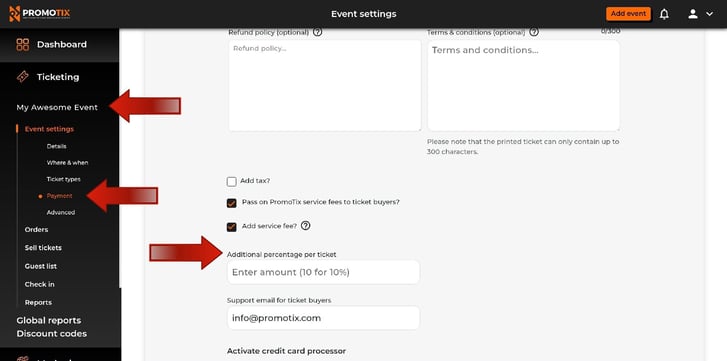
1. Click on your Event

2. Click on the "Payment" tab underneath "Event settings"

3. Check the box that says "Pass on PromoTix servicd fees to ticket buyer?". This will pass on all PromoTix fees to the ticket buyer.

4. Click on the box that says "Add service fee?". Enter a percentage which you would like to add as a service fee across all ticket types on your event.* For example, enter "5" if you would like to add a 5% custom service fee.

*Note: This service fee will be be used to cover credit processing. Any extra fees will be paid out to you.1000002254
 

Still have questions?

Contact Us


Will Royall
Will Royall
Will Royall is the CEO and Founder of PromoTix.

PromoTix is an established provider of event ticketing platforms, event marketing software, event promotion tools, and event management technology used by event organizers around the world to sell more tickets and grow their audiences.

Related Posts

How to connect your Authorize.net account to PromoTix

(Last Updated 3/4/26) Currently PromoTix supports Stripe, PayPal, and Authorize.net for credit card processing. In order to sell paid tickets on PromoTix, you will need to connect at least one payment processor to your events. All revenue from ticket sales will be deposited directly into your chosen payment processing account. For the latest information on Authorize.net's platform, payout schedules, and associated fees, please visit their website here. NOTE: a PromoTix enterprise package is required in order to use Authorize.net with PromoTix. NOTE: the following currencies are supported by both Authorize.net and PromoTix: USD, CAD, AUD, EUR, GBP, NZD, DKK, NOK, ZAR, and SEK. NOTE: currently no credit card terminal is supported by both Authorize.net and PromoTix (only "card not present" transactions are currently supported).

How to connect your PayPal account to PromoTix

(Last Updated 8/11/25) PromoTix supports PayPal as an option for payment processing. In order to sell paid tickets on PromoTix, you will need to connect a supported payment processor (like PayPal) to your events. All revenue from ticket sales will be deposited directly into your PayPal account. For the latest information on PayPal's platform, payout schedules, and associated fees, please visit their website here.

  • 6 min read
  • Aug 14, 2025 4:17:30 PM

How to create custom checkout questions

(Last Updated 7/9/25) There may be times when you need to gather additional information from your ticket buyers that will allow them to enter their own personalized response. Follow this guide to start using the Custom checkout questions feature.

  • 3 min read
  • Jul 9, 2025 2:46:04 PM